


- Introduction and Overview of Digital Asset Security Landscape
- Definitions and Scope of Comparison
- Trezor System Design: Universal vs. Bitcoin-Only Differences
- Trezor Universal (Multi-Coin)
- Firmware Complexity and Attack Surface
- Role of Secure Element (OPTIGA™ Trust M)
- Trezor Bitcoin-Only
- Bitcoin-Only Firmware (Software)
- Bitcoin-Only Hardware Edition (Safe 3/5)
- Blockstream Jade
- Virtual Secure Element and Blind Oracle Mechanism
- In-depth Working Mechanism
- Security Implications
- Stateless Operation and Air-Gapped QR
- SeedQR and Statelessness
- Coldcard (Mk4 and Q)
- Dual Secure Element Architecture
- Air-Gap Philosophy (SD Card & NFC)
- Physical Security
- In-depth Comparative Analysis Table
- Security Model Comparison
- Usability & Workflow
- Depth of "Bitcoin-Only" Features
- In-depth Analysis: The Importance of "Air-Gapping" and "Hardware Lock"
- Air-Gap Philosophy: Reality vs. Marketing
- The Importance of "Hardware Lock"
- Conclusion and User-Based Recommendations
- The "Sovereign Individual" (High Net Worth / Requires Maximum Security)
- The "Stateless Traveler" (Cross-Border Traveler / High-Risk Area)
- The "Bitcoin Beginner" (Prioritizes Ease and Balance)
- The "Diversified Holder" (Holds both Bitcoin and Altcoins)
- Conclusion
Introduction and Overview of Digital Asset Security Landscape
In the current era where digital assets have become a significant part of global investment portfolios, the concept of "self-custody" has evolved from a niche ideology to a fundamental necessity for investors seeking sovereignty over their assets. The hardware wallet market, devices used for signing cryptocurrency transactions, has branched into two distinct core philosophies:
- A group that emphasizes versatility and supports multiple currencies (Universal/Multi-Coin).
- A group that focuses exclusively on Bitcoin (Bitcoin-Only), prioritizing simplicity and maximum security by reducing the attack surface.
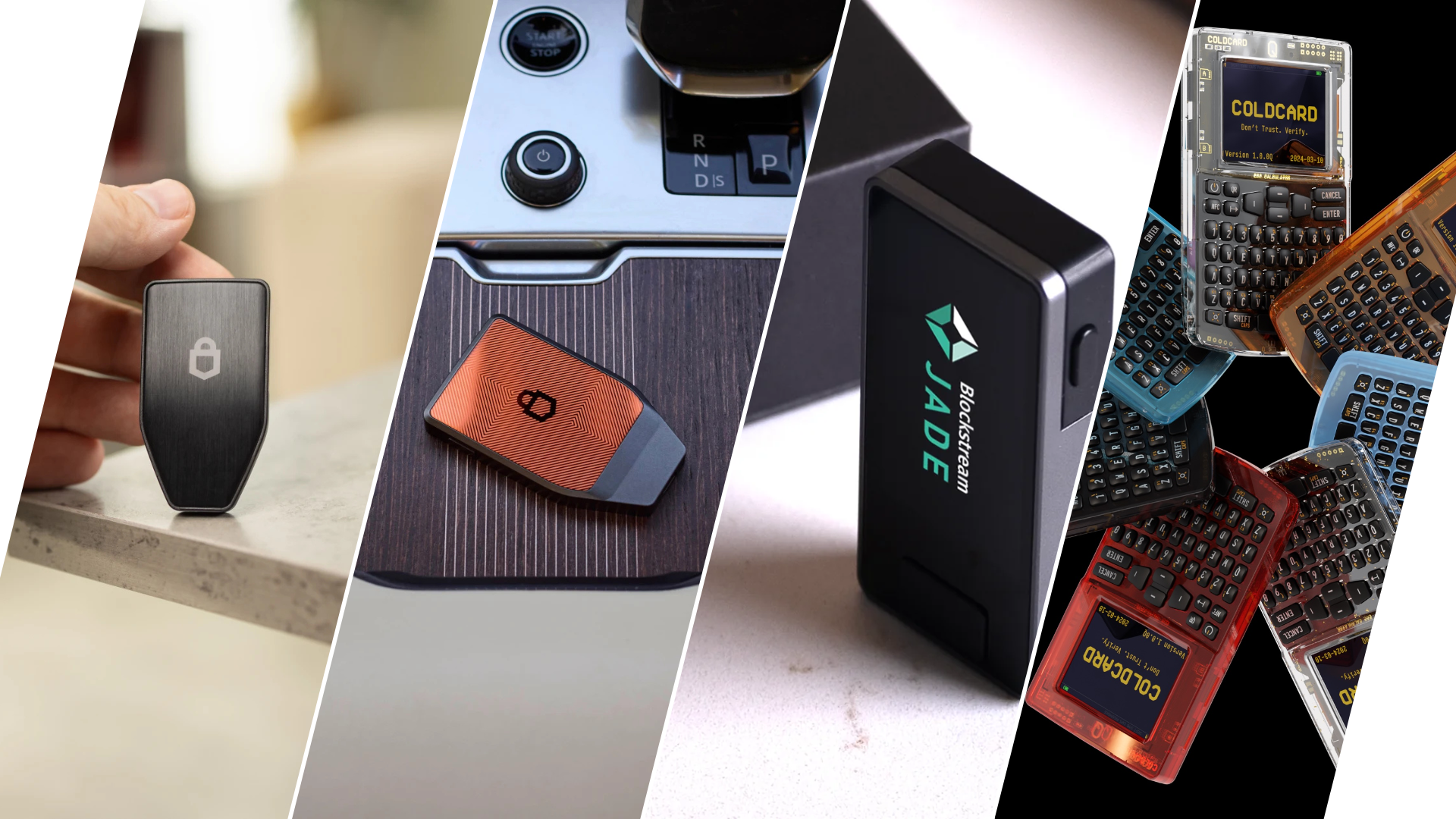
This article provides an in-depth analysis and detailed technical comparison between four leading device groups: Trezor in its Universal (Multi-Coin) form, Trezor in its Bitcoin-Only form, Blockstream Jade, and Coldcard (Mk4 and Q models). It will delve into the firmware architecture, hardware design, private key management, and completely different security models to enable readers to choose the device best suited to their risk tolerance and usage needs.
Definitions and Scope of Comparison
This analysis is not limited to basic technical specification comparisons but extends to the "Security Implications" hidden beneath these designs. We will consider the balance between usability and security, which is a balance all manufacturers must maintain.
The table below provides an overview of the main competitors in the market analyzed in this article.
Table 1.1: Technical Overview and Market Positioning of Devices
| Feature | Trezor Universal (Safe 3/5) | Trezor Bitcoin-Only (Safe 3/5) | Blockstream Jade | Coldcard (Mk4 / Q) |
|---|---|---|---|---|
| Asset Focus | Supports over 8,000 coins and tokens | Bitcoin (BTC) Only | Bitcoin (BTC) and Liquid Network | Bitcoin (BTC) Only |
| Firmware Architecture | Monolithic, multi-protocol support | Streamlined, optimized for BTC | Open Source, works with Blind Oracle | Source Available, runs on Dual SE |
| Secure Element | Optiga Trust M (EAL6+) | Optiga Trust M (EAL6+) | Virtual / Blind Oracle | Dual (Microchip + Maxim) |
| Air-Gap Capability | Limited (via SD card in Safe 5) | Limited (via SD card in Safe 5) | Complete (via camera and QR Code) | Complete (via SD / NFC / QR in Q model) |
| Connectivity Type | USB-C | USB-C | USB-C, Bluetooth, QR Code | USB-C, NFC, SD Card, QR (Q model) |
| Estimated Price Range | Mid-range ($79 - $169) | Mid-range ($79 - $169) | Economical ($64 - $79) | Premium ($157 - $239) |
Understanding these differences is crucial, as each device is built upon a different "Threat Model."
- Trezor emphasizes Open Source transparency and ease of use via USB.
- Blockstream Jade prioritizes easy access at an economical price through its unique server-side security system.
- Meanwhile, Coldcard focuses on physical tamper protection and complete air-gapping for users with the highest security concerns.
Trezor System Design: Universal vs. Bitcoin-Only Differences
Trezor, developed by SatoshiLabs, is a pioneer that originated the hardware wallet industry. The launch of the "Safe" series (Safe 3 and Safe 5) and the recent introduction of Safe 7 represent a significant change from the original models (Model One and Model T), integrating a Secure Element (SE) chip into the architecture to address physical attack vulnerabilities, while maintaining a strong commitment to Open Source. The key issue we will analyze in this section is the in-depth differences between the Universal and Bitcoin-Only systems.
Trezor Universal (Multi-Coin)
Trezor in its Universal form is designed as a versatile cryptocurrency signing device. It is built to meet the needs of users with diverse investment portfolios who must manage a variety of mathematical and blockchain standards.
Firmware Complexity and Attack Surface
Universal firmware is large and complex, requiring libraries for managing keys and transactions for various networks such as Ethereum (using Keccak-256), Solana (using Ed25519), Cardano, and a vast number of ERC-20 tokens. From a security engineering perspective, a large codebase inherently means a larger "attack surface."
- Risk from USB Stack: Trezor Universal relies primarily on USB communication (via WebUSB or Trezor Bridge). History has shown that vulnerabilities in the USB protocol can be exploited as an attack vector. Although the inclusion of the Optiga Trust M Secure Element chip in the Safe 3 and Safe 5 models significantly reduces the risk of physical key extraction compared to older models, the complexity of USB communication remains a factor to consider.
- Update Frequency: Universal firmware requires frequent updates to support hard forks or upgrades of various Altcoin networks (e.g., Ethereum upgrades). This forces users to interact frequently with the Bootloader and Flash memory, which creates opportunities for "Evil Maid" attacks or supply chain intervention if users are tricked into installing malicious firmware.
Role of Secure Element (OPTIGA™ Trust M)
The integration of the OPTIGA™ Trust M (EAL6+) chip in the Safe series marks a significant security enhancement. Unlike Ledger's architecture, which uses a Secure Element to run the entire operating system and logic, Trezor adopts a different approach, using the SE merely as a "safe" to store private keys and verify PINs. Transaction processing still occurs on the open-source STM32 microcontroller. This approach allows Trezor to maintain its auditable open-source status while providing protection against advanced physical attacks, such as voltage glitching with lasers, which was a problem in previous models.
Trezor Bitcoin-Only
The term "Bitcoin-Only" in the context of Trezor is nuanced, referring to both the firmware status and specifically manufactured hardware devices.
Bitcoin-Only Firmware (Software)
Users with a regular Trezor Universal device can choose to flash "Bitcoin-Only" firmware themselves via Trezor Suite. This action replaces the multi-coin logic with a trimmed binary containing only the essential functions for Bitcoin.
- Code Reduction: Removing libraries for other coins significantly reduces the binary size, aligning with the security principle of Minimalism. If there's no code, there are no vulnerabilities to exploit in that code.
- Stability: Bitcoin-only firmware has fewer updates because it doesn't need to keep up with minor altcoin protocol changes, offering users a "Set-and-Forget" experience ideal for long-term cold storage.
- Feature Limitations: When this firmware is installed, the "Switch to Universal" button is hidden from the Trezor Suite interface to emphasize Bitcoin use. However, technically, the Universal hardware can still be wiped and re-flashed with Universal firmware if desired.
Bitcoin-Only Hardware Edition (Safe 3/5)
Trezor produces a special "Bitcoin-Only" hardware version, distinguished by its orange back casing.
- The Hardware Lock: Research indicates a significant difference: this Bitcoin-Only hardware is factory-restricted. Users attempting to install Universal firmware on an orange Trezor Safe 3 will find the operation blocked or unsupported by the Bootloader. The Trezor Suite display will not show the option to switch to Universal for this device.
- Market Positioning: This device targets "Bitcoin Maximalists" who want to make a physical commitment that the device will not be involved with other networks, reducing user error risk and simplifying usage to a single purpose.
Table 2.1: Comparison of Trezor Universal and Trezor Bitcoin-Only
| Feature | Trezor Universal (Safe 3/5) | Trezor Bitcoin-Only (Safe 3/5) |
|---|---|---|
| Firmware Installability | Switchable between Universal and BTC-Only | Locked to BTC-Only Firmware |
| Update Frequency | High (due to Altcoin changes) | Low (only for Bitcoin upgrades) |
| Codebase Complexity | High (includes many libraries) | Low (Minimalist, easier to audit) |
| Target Audience | Diversified portfolio holders | Long-term Bitcoin savers (HODLers) |
Blockstream Jade
Blockstream Jade introduces a completely different concept from traditional hardware wallet architectures. With an accessible price point (around $64-$79), Jade challenges the belief that high security requires expensive hardware and closed-source code.
Virtual Secure Element and Blind Oracle Mechanism
Jade's most distinctive feature is its refusal to use a physical Secure Element chip. The primary reason is to maintain 100% open-source status for both hardware and software (as SE chips often come with NDAs that prohibit disclosure of internal workings). Instead of a chip, Jade uses a Blind Oracle model.
In-depth Mechanism
- Encryption: The wallet's seed phrase is encrypted and stored in the device's Flash memory.
- Key Splitting: The decryption key is not stored solely on the device. Instead, it is "split" – one part is on the device, and the other acts as a remote PIN verification, managed by a server called an Oracle.
- The Handshake: When a user enters their PIN on Jade, the device performs an Ephemeral Diffie-Hellman key exchange with the Blind Oracle server.
- Blindness: What makes this model secure is that the Oracle server does not know the user's PIN or seed. It merely verifies if the hash of the submitted PIN is correct. If correct, it sends the remaining part of the key back, allowing the Jade device to decrypt the seed and use it.
Security Implications
- Protection against Physical Attacks: If a thief steals Jade, they cannot extract the seed physically, for example, by using electron microscopes or electromagnetic attacks, because the data is fully encrypted. They would need a response from the Oracle to decrypt it.
- Brute Force Mitigation: The Oracle enforces a "three strikes" rule. If the PIN is entered incorrectly three times, the Oracle immediately deletes its portion of the key, rendering the encrypted data on Jade mathematically worthless and permanently unrecoverable.
- Centralization Risk: Some critics view this system as creating a reliance on Blockstream's server. However, Blockstream has designed it so that users can host their own Blind Oracle (e.g., on a Raspberry Pi or Umbrel Node), which completely eliminates centralization risk for technically proficient users.
Stateless Operation and Air-Gapped QR
Jade pushes the boundaries of "Air-Gapped" security further by operating via camera and QR Codes, differing from Trezor (which emphasizes USB) or Coldcard (which emphasizes SD Card).
SeedQR and Statelessness
In "Stateless Mode," Jade acts like a blank slate every time it's powered off. It never saves the seed to non-volatile memory.
- Users scan a SeedQR (a QR Code containing 12 or 24 words) with Jade's camera to boot the device.
- The device loads the keys into temporary memory (RAM) for use during that session.
- Users sign transactions via QR Code (scan PSBT from a phone/computer and display the signed transaction on the Jade screen).
- When powered off, all data is immediately erased.
This model renders physical seizure of the device irrelevant to fund security, as no data remains on the device. The burden of security shifts to safeguarding the physical SeedQR sheet.
Coldcard (Mk4 and Q)
Coldcard, manufactured by Coinkite, is widely recognized as the gold standard for "Bitcoin Maximalist" security. The device explicitly rejects altcoin support and focuses deeply on Bitcoin's technical details, such as PSBT (Partially Signed Bitcoin Transactions), Multisig, and Miniscript.
Dual Secure Element Architecture
Coldcard rejects architectures reliant on a single point of failure. Both Mk4 and Q models use two Secure Element chips from different manufacturers.
- Microchip ATECC608
- Maxim DS28C36B
The device's main microcontroller (MCU) acts merely as a coordinator. The private key (Seed Phrase) is encrypted and stored in a way that requires cryptographic handshakes from both Secure Elements and the MCU to recover and use the data.
- Vendor Diversification: This design protects against backdoors embedded by chip manufacturers or the discovery of zero-day vulnerabilities in a single brand of chip. If a national agency could compromise a Microchip chip, the Maxim chip would still protect the user.
- License Difference (Source Available vs. Open Source): Coinkite operates under a "Source Available" license, not fully Open Source by OSI definition. Users can view and audit the code but cannot modify it for commercial purposes or compete with it. This policy allows Coinkite to protect its intellectual property while maintaining auditability, a point often criticized by purists (like BitBox or Jade supporters) but acceptable to pragmatist users in exchange for superior hardware quality.
Air-Gap Philosophy (SD Card & NFC)
Coldcard pioneered the PSBT (BIP-174) standard. The device is designed under the assumption that all computers are riddled with malware. Therefore, Coldcard is designed to never need to be plugged into a computer.
- The Sneakernet: Users save transaction files to a microSD card from a computer (via software like Sparrow Wallet or Electrum), then insert the card into the Coldcard (which is powered by a wall plug or battery) to sign, and then return the card to the computer. This creates a complete physical air gap.
- Virtual Disk Mode: For those who find swapping SD cards cumbersome, Mk4/Q models can emulate a USB drive, allowing drag-and-drop of transaction files. The system remains isolated from normal USB Serial Stack communication, mitigating some risk from USB attacks.
- NFC: Both Mk4 and Q support Near Field Communication, enabling "tap-to-sign" with mobile phones (e.g., via the Nunchuk app). This bridges the gap between cold storage level security and mobile usability convenience.
Physical Security
Coldcard excels in tamper evidence. The device uses transparent plastic (to allow visibility of internal components and detection of foreign chips), comes in a sealed bag with a unique serial number, and features "Anti-Phishing Words." When you enter the first part of your PIN, the device displays two secret words known only to your device's Secure Element. If these words don't match, it indicates you are facing a swapped, counterfeit device (Evil Maid Attack).
In-depth Comparative Analysis Table
Security Model Comparison
This table compares the core mechanisms each device uses to protect secrets, reflecting different security philosophies.
Table 5.1: Comparison of Security Architectures
| Feature | Trezor (Safe 3/5) | Blockstream Jade | Coldcard (Mk4/Q) |
|---|---|---|---|
| Secret Storage Mechanism | EAL6+ Secure Element (Optiga Trust M) | Encrypted Flash + Blind Oracle (Virtual SE) | Dual Secure Elements (Microchip + Maxim) + MCU |
| Trust Assumption | Trust SE chip + Open Source FW | Trust Oracle (or self-host) | Trust 2 chip manufacturers + Source Available FW |
| Physical Attack Resistance | High (SE protects keys) | High (if locked/or using Stateless mode) | Very High (Dual SE + Epoxy) |
| Supply Chain Verification | Hologram Sticker + Software Verification | Software Attestation | Clear Case + Serial on Bag + Anti-Phishing Words |
| Firmware Verification | Bootloader Signature Check | Bootloader Signature Check | Secure Boot + User-Verifiable LED Pattern |
Usability & Workflow
This table shows the actual user experience, from data input to connecting with external devices.
Table 5.2: User Experience (UX) Comparison
| Feature | Trezor (Safe 3/5) | Blockstream Jade | Coldcard (Mk4/Q) |
|---|---|---|---|
| Input Method | 2 Buttons (Safe 3) / Touchscreen (Safe 5) | Wheel + Push Button | Calculator Keypad (Mk4) / QWERTY Keyboard (Q) |
| Main Interface | Trezor Suite (Desktop/Mobile) | Blockstream Green / BlueWallet | Sparrow / Electrum / Nunchuk (No Native App) |
| Mobile Experience | Excellent (USB-C / Android) | Excellent (Bluetooth / QR) | Moderate (NFC / SD requires adapter) |
| Passphrase Entry | Quite Difficult (Safe 3) / Good (Safe 5) | Difficult (Spin to select each character) | Excellent (QWERTY on Q model is very fast) |
| Screen Quality | OLED (Small in Safe 3) / Color Screen (Safe 5) | IPS LCD (Color, Medium Size) | OLED (Tiny in Mk4) / Large LCD (Q) |
Depth of "Bitcoin-Only" Features
Table 5.3: Advanced Bitcoin Feature Comparison
| Feature | Trezor Bitcoin-Only | Blockstream Jade | Coldcard (Mk4/Q) |
|---|---|---|---|
| Multisig Support | Good (via Suite/Sparrow) | Excellent (Green/Sparrow) | Superior (Supports complex policies, PSBTv2) |
| Address Verification | On-screen | On-screen (can display QR) | On-screen (displays text + QR) |
| Miniscript Support | In Development | Yes (Liquid/BTC) | Yes (Native support) |
| CoinJoin Integration | Yes (via Trezor Suite) | No direct / via Sparrow | Yes (via Sparrow/Wasabi) |
| Tor Support | Yes (via Suite) | Yes (Green supports Tor) | N/A (Fully Air-gapped device) |
In-depth Analysis: The Importance of "Air-Gapping" and "Hardware Lock"
Based on the collected data, two critical points affect high-level users' decisions: the nuanced meaning of "Air-Gapped" and the impact of hardware locking.
Air-Gap Philosophy: Reality vs. Marketing
Coldcard's Philosophy
Coldcard believes that electrical connections are vectors of disaster. By using an SD card or QR code, the device is completely galvanically isolated from an internet-connected computer, preventing malware from attacking through a buffer overflow in the wallet's USB stack.
Trezor's Philosophy
Trezor argues that "Air-Gap" is often merely marketing (Security Theater), as SD cards and QR codes are still data transmission vectors. Malware can embed malicious code in QR codes or files on an SD card to attack the wallet's parser. Therefore, Trezor focuses on strengthening the USB stack and using Secure Elements to ensure that even if the computer is hacked, the keys cannot be compromised.
Jade's Middle Ground
Jade offers the most interesting option with its "Stateless" mode combined with an Air-gap. Wiping the device after each use helps reduce risk if the device is seized or physically attacked after use, which is a point neither Trezor nor Coldcard (in normal mode) fully addresses without complex data wiping procedures.
The Importance of "Hardware Lock"
Information confirms that Trezor Safe 3/5 Bitcoin-Only models have a hardware lock to prevent the installation of Universal firmware. This is critical insight for consumers.
- Impact: If a user buys an orange Trezor Safe 3 for its aesthetics, thinking they might "play around" with Ethereum in the future, they will be severely disappointed because they cannot and will have to buy a new device.
- Comparison: Coldcard is Bitcoin-only by design, not due to software locking, but due to memory limitations and an architecture that does not support Altcoins.
- Comparison: Jade supports Liquid (a Bitcoin sidechain) but not other chains like Ethereum or Solana, which is an interesting compromise for those who want to use Bitcoin Layer 2 without opening themselves up to the risks of general "Crypto" 5.
Conclusion and User-Based Recommendations
Based on a detailed analysis of specs, security models, and prices, we can classify recommendations for each user type as follows:
The "Sovereign Individual" (Wealthy / Demanding Maximum Security)
Recommendation: Coldcard Q
- Reason: The combination of a QWERTY keyboard for high-entropy passphrase entry, Dual Secure Elements for redundancy, and a strictly Air-gapped workflow (battery + QR/SD) offers the highest theoretical security ceiling. Physical tamper-evident features provide peace of mind against Evil Maid attacks.
- Recommended Software: Sparrow Wallet (Desktop) via SD Card
The "Stateless Traveler" (Cross-border Traveler / Risky Areas)
Recommendation: Blockstream Jade
- Reason: The ability to use the device statelessly (scan SeedQR -> sign -> wipe) makes it the only device on this list that can be seized for inspection without any data leakage. Its affordable price makes it easy to replace if lost.
- Recommended Software: Nunchuk or Blockstream Green (Mobile) via QR Code
The "Bitcoin Beginner" (Focus on Ease and Balance)
Recommendation: Trezor Safe 3 (Bitcoin-Only)
- Reason: Trezor's ecosystem is the most user-friendly. The "Bitcoin-Only" version removes the complexity of Altcoins and ensures maximum firmware stability. The EAL6+ chip addresses security concerns present in older models regarding physical attacks. The plug-and-play USB connection simplifies the hassle of managing SD cards or scanning QRs for less tech-savvy users.
- Recommended Software: Trezor Suite (Desktop)
The "Diversified Holder" (Holds both Bitcoin and Altcoins)
Recommendation: Trezor Safe 5 (Universal)
- Reason: Although this article focuses on Bitcoin-only, for those with diverse interests, Trezor Safe 5 Universal offers EAL6+ security for Bitcoin while retaining the ability to sign Solana or Ethereum transactions. It's the only device in this comparison that can seamlessly switch between these two worlds (Bitcoin/Altcoins). The color touchscreen and haptic feedback significantly enhance the premium user experience.
- Recommended Software: Trezor Suite for BTC and connecting with MetaMask/Phantom for Altcoins
Conclusion
Choosing between Trezor Multi-Coin, Trezor Bitcoin-Only, Jade, and Coldcard isn't just about asking "what's most secure?" because all four devices use robust mechanisms (EAL6+ chips, Dual SEs, or Blind Oracles) to protect private keys from remote attacks.
The true difference lies in the lifecycle of the key and the philosophy of use.
- Trezor views keys as static objects protected by a chip, conveniently accessible via a USB bridge.
- Coldcard views keys as treasures deeply embedded in a fortress, accessible only through strict Air-gapped rituals.
- Jade views keys as compartmentalized or ephemeral, protected by cryptographic blindness and statelessness.
For general users:
- If your goal is to hold Bitcoin for ten years, Coldcard Mk4/Q or Trezor Safe 3 Bitcoin-Only are superior choices due to their minimal attack surface.
- If the goal is frequent use, low cost, and portability, Jade is a suitable choice.
- If you need a single device to manage a diverse investment portfolio while maintaining high security for Bitcoin, Trezor Safe 5 Universal remains a top choice for many.
And the most important philosophy and concept is: “Not your keys, Not your coins.” :)
แชร์:
Warning: Trezor Phishing! 'Failed update' scam steals Recovery Seed
Summarize the difference between a Cold Wallet and a Hardware Wallet