


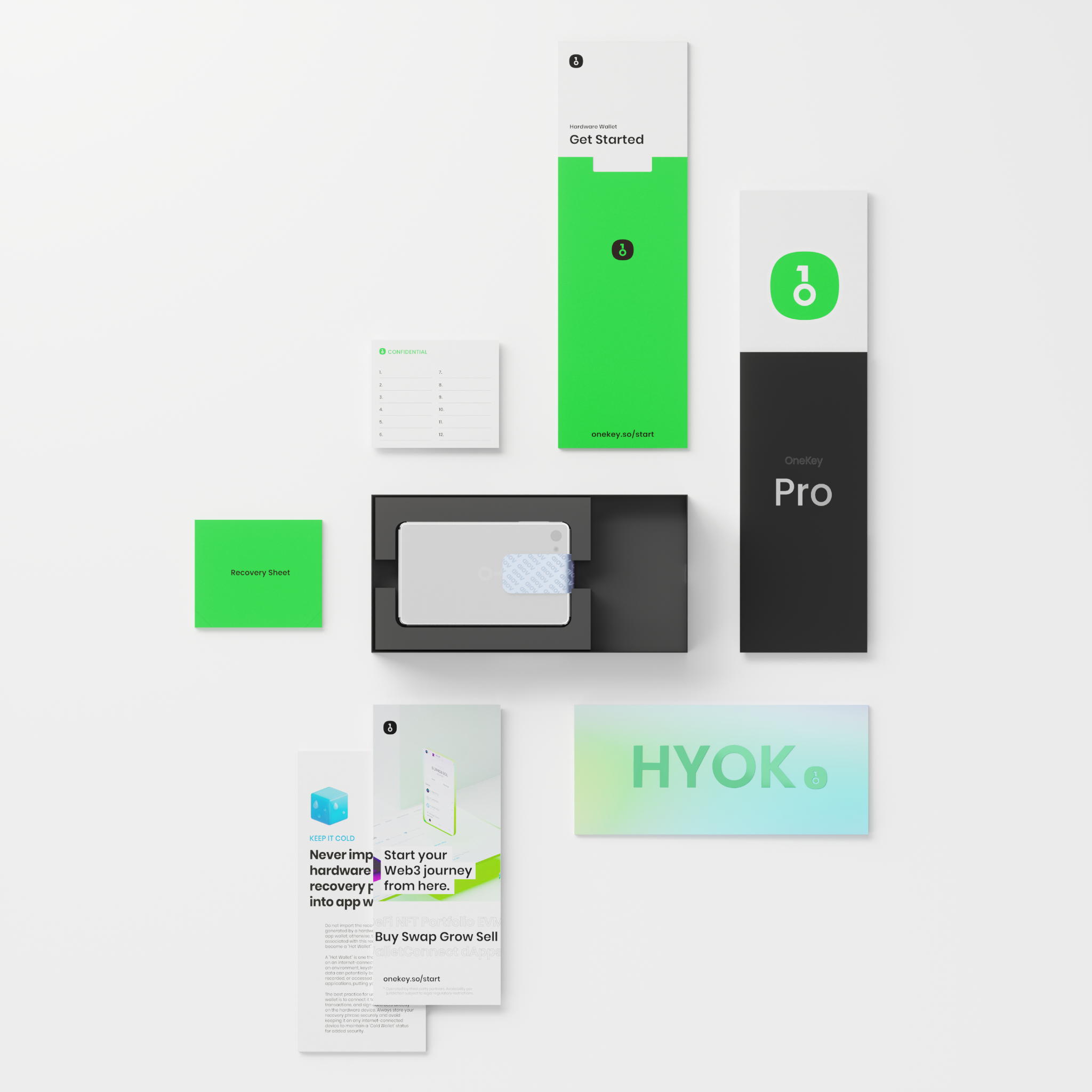
- 1. Check the box condition and Holographic Security Seal
- 2. The Seed Phrase recovery sheet must always be "blank".
- 3. Verify authenticity with Device Authentication on the OneKey App
- 4. Verify software and firmware integrity (Open-Source & Signature Check)
- 5. Eliminate concerns from the source: purchase from an official Authorized Reseller
- Summary Table: OneKey Authenticity Checkpoints vs. Red Flags
- Conclusion
- Frequently Asked Questions (FAQ)
- Q1: What should I do if the holographic sticker is slightly torn after unboxing?
- Q2: If I've already created a wallet but still feel uneasy, can I reset the device?
- Q3: How can OneKey send data for authenticity checks on the app without compromising the Seed Phrase?
- Q4: Do OneKey Classic 1S and OneKey Pro use the same verification method?
For those embarking on their Self-Custody journey, acquiring a Hardware Wallet is the most critical step in protecting your digital assets. However, a common concern I often hear is: "Is the device I bought genuine? Has it been tampered with or had malware installed (Supply Chain Attack)?"
This concern is 100% valid, as a Hardware Wallet is the last line of defense for our savings. Today, I've compiled a checklist of 5 ways to differentiate genuine OneKey devices from fakes, from the physical box condition to using digital verification systems (Cryptographic Attestation) via the official application. This guide will help you calmly check each step, along with links to official OneKey manuals.
1. Check the box condition and Holographic Security Seal
The first step begins when the package arrives. Inspect the external packaging carefully:
- Box Film and Box Itself: The box must be in perfect condition, free from dents, wrinkles, or signs of being cut open and resealed with clear tape.

- Tamper-evident Holographic Seal: All OneKey boxes, whether for OneKey Pro or OneKey Classic 1S, will always have a reflective foil holographic sticker sealing the opening of the box.

- Signs of Tampering: If the sticker is torn, peeled off, or shows a printed grid pattern/ "Void" message, it indicates the box has been opened. Do not use the device and contact the seller immediately.
2. The Seed Phrase recovery sheet must always be "blank".
This is the most classic and dangerous scam in the Hardware Wallet industry, which I want to emphasize.

Inside the OneKey box, there will be 3 Recovery Sheet Cards. Every line and space must be 100% blank paper.
- 🚨 Absolutely Forbidden: If you open the box and find 12 or 24 English words pre-printed or written on the paper, or a scratch-off sticker like a top-up card, it is 100% a fraud/scam. Criminals create a wallet in advance, waiting for you to transfer funds so they can steal them immediately.
- ✅ Fact from OneKey Official: OneKey explicitly states in official documents that the company has no policy and will never pre-print recovery phrases. The 12/24 word phrase must be newly generated on the OneKey device screen during the initial setup process only.
3. Verify authenticity with Device Authentication on the OneKey App
If the box condition checks out, the most accurate and technically secure step is to have the OneKey system verify the security chip inside the device through its Anti-counterfeiting & Device Authentication system.
How does this system work? When connected, the OneKey App sends a Cryptographic Challenge to the Secure Element (EAL6+ security chip) on the OneKey device to verify its unique digital signature (Unique Device Certificate) from the factory. Only genuine chips manufactured by OneKey can respond to this verification. This process does not access or touch the Private Key / Seed Phrase inside the device, making it 100% secure. This verification occurs during the initial connection process with the OneKey app.
4. Verify software and firmware integrity (Open-Source & Signature Check)
Another key aspect of OneKey is its 100% Open-Source nature, encompassing hardware, firmware, and the OneKey App software.
For advanced users seeking the highest level of assurance, you can manually verify the integrity of downloaded files.
- GPG Signature Verification: Check if the downloaded OneKey App installer is genuinely signed by the OneKey development team using GPG keys (see how to do this at Verify OneKey App Packages with GPG Signatures).
- SHA-256 Checksum: Calculate the SHA-256 hash value of the installer file and compare it with the hash value on the official server to prevent file modification by malware during transit (Authenticate file consistency with server versions).
- Firmware Consistency Check: Verify that the firmware file on the device matches the Source Code published on GitHub (Authenticate firmware consistency with open source code).
5. Eliminate concerns from the source: purchase from an official Authorized Reseller
The easiest and safest way to avoid the risk of counterfeits is to purchase from an officially appointed distributor.
- Avoid Second-Hand Purchases: Hardware Wallets should never be bought second-hand, as you cannot know if the previous owner has tampered with the internal hardware or secretly stored any data.
- Beware of General Stores on Various Apps: Purchasing from unauthorized retailers may risk getting a modified device.
- Check the List of Official Resellers: OneKey publishes a list of officially certified distributors worldwide on its Help Center website. Customers who purchase through these channels will receive proper protection, warranty, and after-sales service. You can check the list directly at OneKey Reseller Network — OneKey Official Directory (which includes Thai Bitcast Co., Ltd as an official distributor in Thailand).

Summary Table: OneKey Authenticity Checkpoints vs. Red Flags
| Inspection Point | ✅ Genuine Characteristics (Safe & Genuine) | 🚨 Red Flags (Should Cease Use) |
|---|---|---|
| 1. External Box Condition | Film seal intact, holographic sticker perfectly reflective, never torn. | Holographic sticker torn, shows 'Void' pattern, or has clear tape over cuts. |
| 2. Seed Phrase Card | 100% blank paper card, no pre-printed text whatsoever. | Contains 12/24 words already printed or a scratch-off code sticker. |
| 3. First Wallet Creation | Seed Phrase words are randomly generated and displayed only on the OneKey device screen. | Device has a wallet and PIN already set without needing to create new ones. |
| 4. OneKey App Authentication | Passes Device Authentication, showing "Verification successful". | System alerts Failed, Unrecognized Device, or refuses connection. |
| 5. Product Origin | Purchased directly from Official Website or an Authorized Reseller with official listing. | Bought second-hand, or from an unauthorized seller with unclear origins. |
Conclusion
The same principles and standards apply. This includes checking the holographic sticker, ensuring the Seed Phrase card is blank, and using the Device Authentication menu within the OneKey App.
The ultimate goal of self-custody for Bitcoin and crypto is not just owning a Hardware Wallet, but "peace of mind and confidence" that our hard-earned assets are secure and solely under our control.
Taking a few minutes to check the box condition, the paper card, and verifying identity on the OneKey App as described above will help eliminate the risk of supply chain attacks that could cause us worry.
If you're looking for a user-friendly, easy-to-understand, and open-source Hardware Wallet, I recommend purchasing OneKey through an official authorized distributor in Thailand, such as Bitcast. Not only will you receive a 100% genuine device directly from the factory, but you'll also have a support team to guide you through setup and provide consultation throughout your usage. Contact us via LineOA: @bitcast.
Frequently Asked Questions (FAQ)
Q1: What should I do if the holographic sticker is slightly torn after unboxing?
If the sticker is torn or shows clear signs of tampering, it is recommended not to proceed with setup or transfer coins to the device. Take photos/videos of the box condition as evidence and immediately contact the seller or distributor you purchased from to request a replacement.
Q2: If I've already created a wallet but still feel uneasy, can I reset the device?
Absolutely! You can go to the settings menu on your OneKey device -> select Reset Device to wipe all data. Then, connect to the OneKey App to run Device Authentication again to confirm authenticity, and only then proceed to "Create New Wallet" to generate a new set of seed words for use.
Q3: How can OneKey send data for authenticity checks on the app without compromising the Seed Phrase?
The verification mechanism works by sending a Cryptographic Challenge to the Secure Element (SE). The chip then responds with its unique factory Digital Signature to confirm it's a genuine chip. This process operates completely separate from the Private Key storage area and cannot extract seed phrase data externally.
Q4: Do OneKey Classic 1S and OneKey Pro use the same verification method?
All the same principles and standards are applied, including checking the hologram sticker, ensuring the Seed Phrase card is blank, and pressing the Device authentication menu in the OneKey App.
![[NEWS] สรุปประเด็นกฎหมายคริปโตล่าสุด](http://thaibitcast.com/cdn/shop/articles/Cover11-1791345226262.png?v=1791345941&width=3840)

แชร์:
What is a cold wallet?
What is a Seed Phrase? Why is a piece of paper with 12-24 words the most crucial element in storing cryptocurrency?