



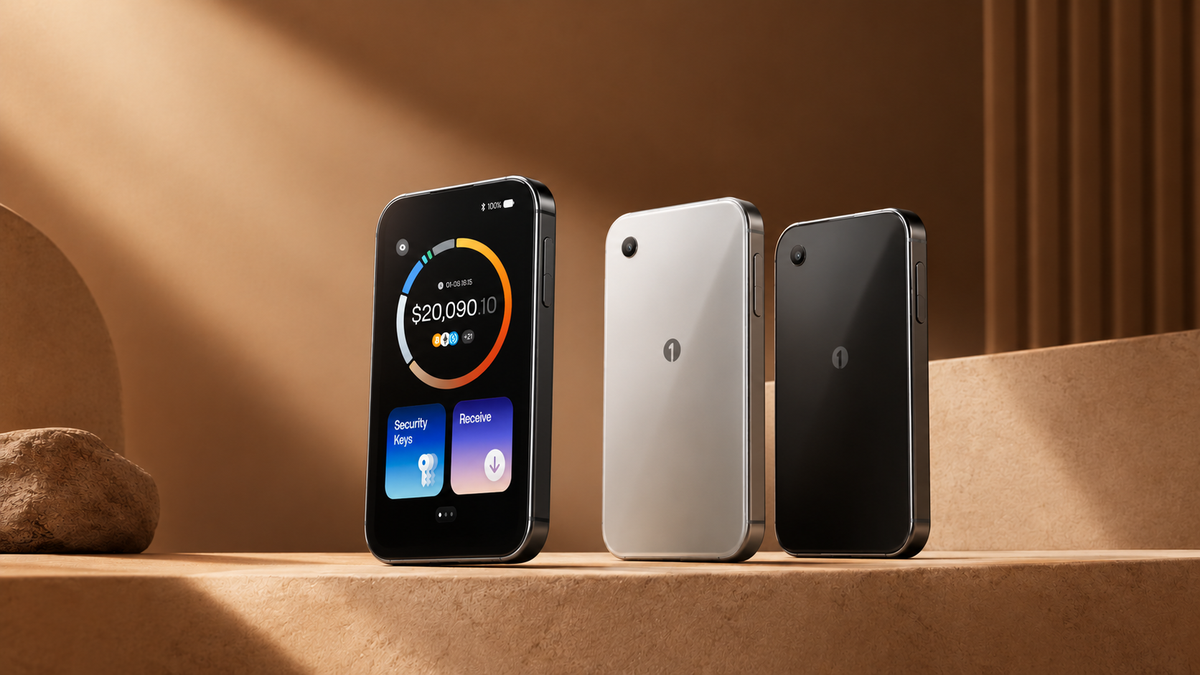
For those looking for a new hardware wallet from OneKey, the OneKey Pro 2 is a model worth keeping an eye on. It is an upgrade from the OneKey Pro, featuring improvements to the screen, design, operating system, and features for daily use.
However, releasing a new model doesn't necessarily mean everyone needs to upgrade. Today, Bitcast will take a look at what makes the OneKey Pro 2 interesting, how it differs from the previous model, and who it is suitable for.
New design with an AMOLED screen
The OneKey Pro 2 comes with a 3.54-inch AMOLED touchscreen, a resolution of 1,024 × 604 pixels, and a peak brightness of 800 nits, making it easier to read information and verify transaction details on the device.
An AMOLED screen is a color display that offers sharp images, vivid colors, and deeper blacks compared to the IPS screen used in the original OneKey Pro.
The device has also been refined to be thinner and lighter, featuring an aluminum frame and a glass back, along with a fingerprint sensor for device unlocking. Additionally, it supports wireless charging and an IP56 rating for protection against dust and water splashes, though it is not fully waterproof.
These changes may seem purely aesthetic, but for a device frequently used to verify and sign transactions, a readable screen and a portable design significantly improve the user experience.
What is safeOS 2 and how does it differ from the previous version?
Another significant change in the OneKey Pro 2 is safeOS 2, a software system that OneKey has redesigned in both interface and operational structure; it is not just a theme update for a modern look.
What is clearly visible is the update to the interface, menus, icons, and animations, which now run more smoothly. According to manufacturer tests, this structural system improvement increases rendering rates by over 60% compared to the previous version.
Furthermore, safeOS 2 supports displaying a portfolio overview directly on the device, making it easier to check asset information when synced with the OneKey App, while also preparing for new feature support through future software updates.
However, the switch to safeOS 2 does not automatically mean the device is inherently more secure, as the security of a hardware wallet still depends on several factors, including system design, private key management, and security verification processes.
Air-Gapped, Clear Signing, and SignGuard
The OneKey Pro 2 supports Air-Gapped transaction signing via QR Code, allowing users to transfer transaction data between an application and the hardware wallet without needing to connect the device via USB or Bluetooth during the process.
Once transaction data is received, the device is used to verify the details and sign before sending the signed data back to the application.
Another important component is Clear Signing, which displays detailed transaction information supported by the device for verification before confirmation, while SignGuard helps analyze and warn of potential risks during usage.
Both features serve different purposes but provide users with more information for decision-making. However, no system guarantees the detection of all malicious transactions or scams, so reading the details before pressing confirm remains essential.
New features for improved usability
One of the interesting capabilities of the OneKey Pro 2 is the ability to display a portfolio overview on the device. Data from the OneKey App can be shown on the screen, making it easier to check your total assets without having to open the phone every time.
Another feature is Apple Find My, which aims to help locate the device if misplaced. The Find My network can use nearby Apple devices to detect and send location data. You should check the activation status provided by the manufacturer, as this feature may require a software update.
It must be understood that Apple Find My helps track the device itself and does not assist in recovering a private key or preventing asset theft directly.
There are also features related to online authentication, such as FIDO2 Passkeys and TOTP, depending on the capabilities and support status of each software version. Users should verify which features are currently enabled.

How does the OneKey Pro 2 differ from the original OneKey Pro?
For those considering purchasing a new hardware wallet or who already own a OneKey Pro, a key question is how the Pro 2 differs from the previous model.
Both models maintain the same core principles: using four Secure Element chips, supporting QR code signing, featuring a touchscreen, fingerprint unlocking, and multi-connectivity. Therefore, the Pro 2 does not completely change the core philosophy but focuses on refining various details.
The clear differences are as follows:
| Item | OneKey Pro | OneKey Pro 2 |
|---|---|---|
| Screen | 3.5-inch IPS | 3.54-inch AMOLED |
| Resolution | 480 × 800 pixels | 1,024 × 604 pixels |
| Peak Brightness | approx. 500 nits | Up to 800 nits |
| Thickness | Approximately 7.6 mm | Approximately 6.2 mm |
| Weight | Approximately 65 grams | Approximately 53 grams |
| Battery | 530 mAh | 700 mAh |
| Security chip | 4 EAL6+ chips | 4 EAL6+ chips |
| Operating system | safeOS | safeOS 2 |
| Wireless charging | Supported | Supported |
| QR code signing | Supported | Supported |
| Apple Find My | Not supported according to the stated specifications | Currently not supported, but support is planned via an update |
| On-device port overview | This feature is not available according to the comparison data | Supported |
Note: The specification data is based on OneKey product information and should be checked for the latest details before publication
From the table, you can see that the most noticeable change is the screen, which has switched from IPS to AMOLED with higher resolution and brightness. This should make it easier to read text and review transactions, especially for those who frequently check details on the device.
The device is also thinner and lighter, while the battery capacity has increased from 530 mAh to 700 mAh. However, increased battery capacity does not always mean proportionally longer usage, as it also depends on screen usage, connectivity, and actual usage patterns.
In terms of security, both models have 4 Secure Element EAL6+ chips. Therefore, it should not be concluded that the Pro 2 is more secure simply because it is a newer model. Instead, software improvements, the transaction review experience, and additional features should also be considered.
For those who already own the original OneKey Pro, upgrading depends on how well these new features meet their actual needs.
Who is the OneKey Pro 2 for?
If you are looking for a new hardware wallet with a large touchscreen, air-gapped signing support, and features that make it easier to review information, the OneKey Pro 2 is a model worth considering.
However, if you already have the original OneKey Pro and it still meets your needs, there is no need to rush to upgrade just because a newer model has been released. The decision should depend on how much you need a better screen, a thinner device, or these new features.
Summary
The OneKey Pro 2 builds on the OneKey Pro with an AMOLED screen, a thinner and lighter design, safeOS 2, and new capabilities that make it easier to use, while the core features of private key storage and transaction signing remain central to the device.
Ultimately, the hardware wallet that is right for you does not have to be the model with the most features, but rather a device you understand how to use, can carefully review transactions, and can securely manage your Recovery Phrase.
แชร์:
What is xPub (Extended Public Key), and why is it important for everything from single-signature wallets to multisignature systems?